Blog
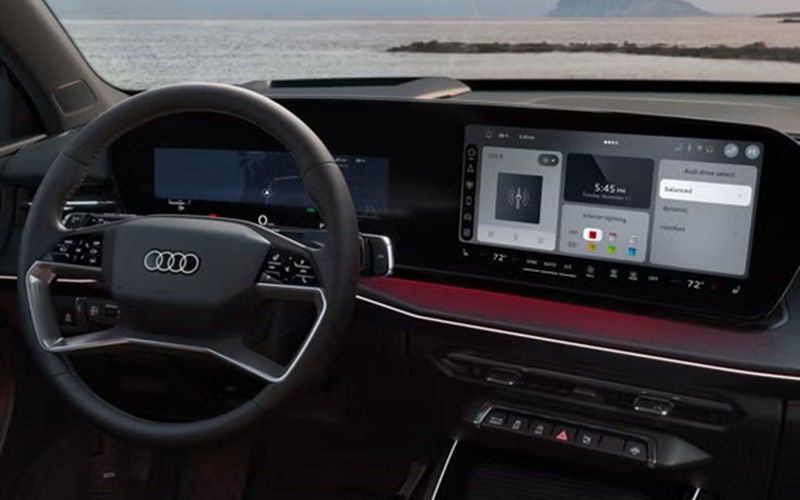
Audi Q3: How to Change the Speedometer from km/h to mph?
If you drive an Audi Q3 in Canada and need to switch the speedometer from kilometers per hour (km/h) to miles per hour (mph), you may need to change the unit settings before travelling or driving in regions that use different speed standards.
How the speed display works in the Audi Q3
The Audi Q3 available in Canada uses a digital or semi-digital instrument cluster to display vehicle speed. Depending on model year and trim, this may include:
A digital display within the instrument cluster
Audi Virtual Cockpit (fully digital cluster, if equipped)
Central infotainment system (MMI) for settings
The speedometer is controlled electronically, meaning the displayed units (km/h or mph) can be adjusted through system settings rather than requiring any physical modification.
Why is the speedometer set to km/h in Canada?
Vehicles sold in Canada display speed in kilometers per hour by default, as this is the standard unit used on Canadian roads.
However, Audi allows drivers to switch units when needed, for example:
Travelling to regions where mph is used
Personal preference for speed display
Temporary adjustments for cross-border driving
How to change the speedometer from km/h to mph
The exact steps may vary slightly depending on the model year and whether your Audi Q3 has a fully digital cluster or a standard display. However, the general process is similar across Canadian-market models.
Method 1: Using the infotainment system (MMI)
Turn on the ignition
Ensure the vehicle is in accessory or running mode.Access the main menu
Use the central touchscreen or control interface.Go to “Settings”
Locate the system or vehicle settings menu.Select “Units” or “Display settings”
This section controls measurement preferences.Find “Speed” or “Speed units”
Choose between km/h and mph.Select “mph”
Confirm the change.
The speedometer display should update immediately after selection.
Method 2: Using the instrument cluster controls
On some Audi Q3 configurations, especially those with Audi Virtual Cockpit:
Use steering wheel controls
Navigate through the instrument cluster menu.Access settings or preferences
Look for unit settings.Locate speed units
Switch from km/h to mph.Confirm selection
This method allows direct control without using the central screen.
What happens after changing the units
Once the speedometer is set to mph:
The primary speed display will show miles per hour
Secondary displays (if available) may still show km/h as a reference
Distance-related units (such as trip or range) may also adjust depending on settings
The change is reversible at any time using the same steps.
Possible variations depending on configuration
The Audi Q3 may behave slightly differently depending on the features available in Canada.
Digital vs analog displays
Fully digital clusters allow more flexible unit customization
Analog clusters may show km/h prominently with mph as a smaller secondary scale
Linked unit settings
In some configurations, changing speed units may also affect:
Distance (kilometers vs miles)
Fuel consumption units
This depends on how the system groups measurement preferences.
Model year differences
Menu layout and naming conventions may vary slightly between model years, but the functionality remains consistent.
Step-by-step: quick check if the change worked
After adjusting the setting, confirm the change:
Look at the main speed display
Ensure mph is shown instead of km/h
Drive briefly and verify that speed values correspond to mph
Check trip or distance units if needed
What to check and what to expect
Normal behavior:
Speed display updates immediately after selection
No warning messages appear
The system retains the selected unit after restarting the vehicle
What may vary:
Menu location depending on system version
Whether km/h remains visible as a secondary reference
Whether other units change automatically
When additional attention may be needed:
If the setting does not save after restarting
If the menu option is not visible
If the display does not update after selection
Unit flexibility in the Audi Q3
The Audi Q3 is designed to accommodate different regional standards, which is why switching between km/h and mph is built into the system. This flexibility ensures that the vehicle can adapt to:
Cross-border travel between Canada and the United States
Driver preference for measurement units
Different regulatory environments
Find the right Audi Q3 mode for you
If you’re asking how to change the speedometer from km/h to mph in an Audi Q3, the process is handled through the vehicle’s settings—either in the infotainment system or the instrument cluster. The system allows quick and reversible changes without requiring any mechanical adjustment.
Once updated, the speed display will reflect mph immediately, helping align with your driving needs or location. If you’re unable to locate the setting or the change does not apply correctly, consulting an official Audi dealership can help confirm your system configuration and ensure everything is working as intended.
*Disclaimer: Content contained in this post is for informational purposes only and may include features and options from US or internacional models. Please contact the dealership for more information or to confirm vehicle, feature availability.*
*Disclaimer: Content contained in this post is for informational purposes only and may include features and options from US or internacional models. Please contact the dealership for more information or to confirm vehicle, feature availability.*